

As a videoscope supplier, I'm often asked whether a videoscope can be connected to a computer. This question is crucial for many users, as the ability to connect a videoscope to a computer can significantly enhance its functionality and usability. In this blog post, I'll delve into this topic, exploring the technical aspects, benefits, and methods of connecting a videoscope to a computer.
Technical Feasibility
The short answer is yes, a videoscope can be connected to a computer. Most modern videoscopes are designed with connectivity in mind, equipped with various interfaces that allow them to communicate with external devices, including computers. These interfaces typically include USB, HDMI, and Wi - Fi, each with its own advantages and limitations.
USB is one of the most common interfaces for connecting a videoscope to a computer. It is widely supported by almost all computers, both desktops and laptops. A USB connection provides a stable and reliable data transfer link, allowing the videoscope to send real - time video and image data to the computer. With a USB connection, users can easily view, capture, and store the images and videos obtained from the videoscope on their computer's hard drive.
HDMI is another popular option, especially for high - definition video output. HDMI can transmit uncompressed high - quality video and audio signals, providing a crystal - clear viewing experience on the computer monitor. This is particularly useful when inspecting detailed objects or areas, as it allows users to see every nuance of the inspected area.
Wi - Fi connectivity offers a more flexible solution. It enables wireless communication between the videoscope and the computer, eliminating the need for physical cables. This is beneficial in situations where mobility is required, such as when conducting inspections in large industrial facilities or in outdoor environments. With Wi - Fi, users can operate the videoscope from a distance and view the results on their computer in real - time.
Benefits of Connecting a Videoscope to a Computer
Connecting a videoscope to a computer brings numerous benefits. Firstly, it allows for easy data management. Once the videoscope is connected to the computer, users can save the captured images and videos in various file formats, such as JPEG, PNG, and MP4. These files can then be organized, labeled, and stored on the computer's hard drive for future reference. This is particularly useful for quality control, maintenance records, and documentation purposes.
Secondly, it enables advanced image and video processing. Many computer software applications offer powerful editing and analysis tools for videoscope images and videos. Users can enhance the image quality, measure distances and angles, and perform other analytical tasks. For example, in industrial inspections, these tools can help identify defects, cracks, or other issues with greater accuracy.
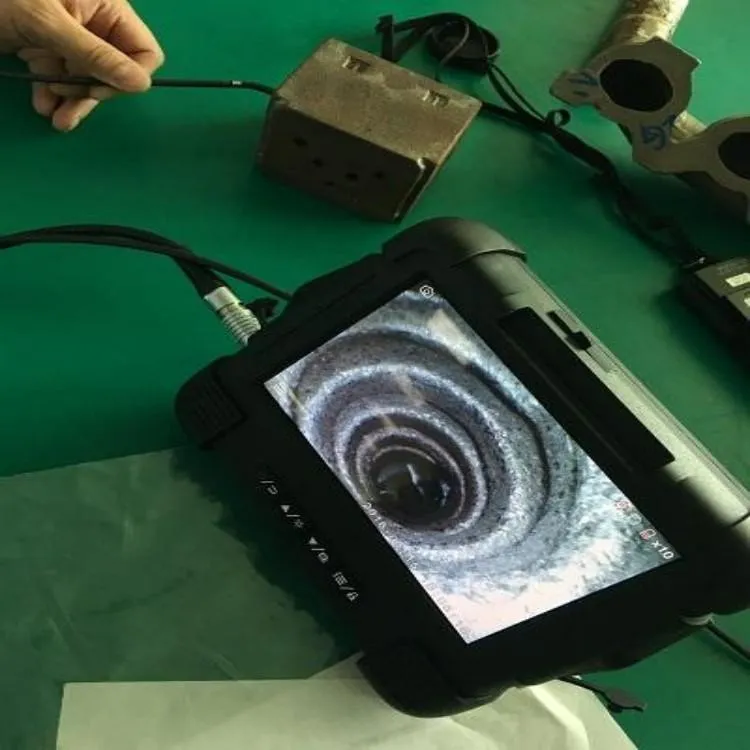

Thirdly, it facilitates sharing and collaboration. With the videoscope connected to the computer, users can easily share the inspection results with colleagues, clients, or experts. They can send the files via email, upload them to cloud storage, or present them during meetings. This promotes better communication and decision - making, especially in team - based projects.
Methods of Connecting a Videoscope to a Computer
USB Connection
To connect a videoscope to a computer using a USB cable, follow these steps:
- Ensure that the videoscope and the computer are powered off.
- Connect one end of the USB cable to the videoscope's USB port and the other end to the computer's USB port.
- Power on the videoscope and the computer. The computer should automatically detect the videoscope and install the necessary drivers if they are not already installed.
- Once the drivers are installed, open the appropriate software on the computer. This software is usually provided by the videoscope manufacturer and can be used to view, capture, and manage the videoscope data.
HDMI Connection
For an HDMI connection:
- Turn off both the videoscope and the computer.
- Connect one end of the HDMI cable to the videoscope's HDMI output port and the other end to the computer's HDMI input port.
- Power on the videoscope and the computer. Select the appropriate HDMI input source on the computer monitor.
- The videoscope's video output should now be displayed on the computer monitor. You may need to adjust the display settings on the computer to optimize the viewing experience.
Wi - Fi Connection
To connect via Wi - Fi:
- Power on the videoscope and enable its Wi - Fi function. This is usually done through the videoscope's menu settings.
- On the computer, search for available Wi - Fi networks and select the videoscope's network. Enter the password if required.
- Once the connection is established, open the corresponding software on the computer. This software will allow you to connect to the videoscope wirelessly and access its functions.
Our Videoscope Products
As a videoscope supplier, we offer a wide range of high - quality videoscopes that are compatible with computer connections. Our Industrial Videoscope is specifically designed for industrial inspections. It features a durable construction and advanced imaging technology, making it suitable for harsh industrial environments. With its multiple connectivity options, including USB, HDMI, and Wi - Fi, it can be easily connected to a computer for efficient data management and analysis.
Our High Performance Multifunctional Industrial Videoscope takes industrial inspections to the next level. It offers high - resolution imaging, advanced measurement functions, and seamless computer connectivity. This videoscope is ideal for complex industrial applications where precision and reliability are essential.
In addition, we also provide Police Videoscope for law enforcement agencies. This videoscope is designed to meet the specific needs of police operations, such as search and rescue, evidence collection, and surveillance. It can be connected to a computer to facilitate data sharing and analysis, helping the police to make more informed decisions.
Conclusion
In conclusion, connecting a videoscope to a computer is not only possible but also highly beneficial. It enhances the functionality of the videoscope, simplifies data management, and promotes better collaboration. Whether you are in the industrial sector, law enforcement, or any other field that requires inspection and monitoring, a videoscope connected to a computer can be a valuable tool.
If you are interested in our videoscope products or have any questions about videoscope - computer connections, please feel free to contact us for procurement and further discussion. We are committed to providing you with the best solutions and support.
References
- "Videoscope Technology and Applications" - Industry Research Report
- Manufacturer's Manuals for Our Videoscope Products